Closing the AI readiness gap in B2B sales
A salesperson finishes a promising customer call. Their next meeting is starting, the contact record needs updating and the agreed follow-up is still sitting in their head.
That is a useful place to begin a conversation about AI. There is a recognisable job to do, a person who needs support and a customer who will benefit if the detail is carried forward properly.
During October, we developed Always On around jobs like this. The updates include voice notes, approved actions through Dan, more manageable prospecting lists and clearer meeting and enquiry workflows. Our research helps explain why making those jobs easier matters.
What the research tells us
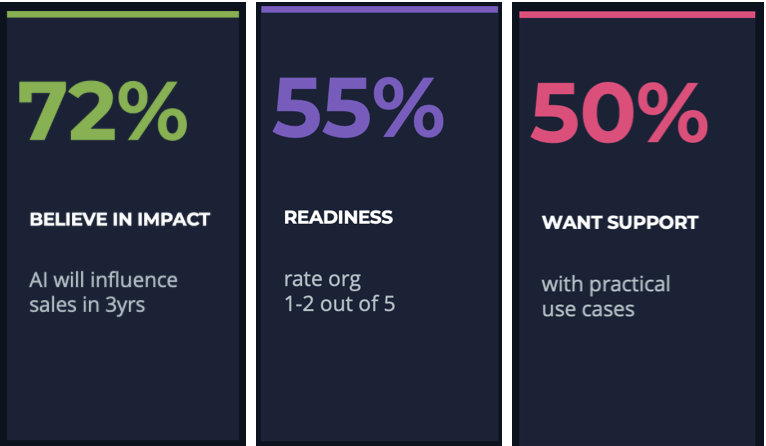
In Plan Grow Do’s ongoing AI readiness research across lubricants and industrial manufacturing, 72% of respondents believe AI will significantly influence lubricant sales within three years. Yet 55% rate their organisation’s AI readiness at just 1 or 2 out of 5. Half want more practical examples of where AI can create value.
Source Plan Grow Do AI readiness research
I read those findings as a clear brief for commercial leaders. People need to see how AI fits into a familiar task and understand what remains their responsibility. A useful first step could be improving the quality of a meeting write-up or making enquiry ownership clearer.
Capture the detail while it is fresh
In technical sales, a brief comment can be commercially useful. A buyer mentions a planned shutdown, a problem with their current supplier or a change in production. Those details can help shape the next conversation, provided someone records them.
October’s voice features give the salesperson another way to do that. They can dictate their own notes after the conversation, check the transcript and edit it before use. Voice input is available in notes, Send to Dan and chats with Dan and Caroline, with a separate Talk to Dan page designed for a phone.
Dan can also prepare record updates. A request might cover logging the call, adding a note and changing a contact detail. He puts the proposed changes onto a card for the user to check and confirm. Names, numbers and days heard through Talk to Dan are repeated back for checking.
These are personal notes after a conversation, rather than recordings of the customer. The intended benefit is a shorter path from remembering something useful to making it available for the next person who needs it.
For a team leader, a sensible question is whether more conversations are being written up while the detail is fresh. That tells you more about the value of the feature than the number of times someone has opened it.
Give the team a workable prospecting plan
A list of contacts needs a decision about where to start. Someone has to consider fit, ownership and the reason for making contact. The team then needs enough time to follow through.
Dan can now review imported lists and propose how to work them, including priorities, suggested owners and first moves. Managers review the plan before it becomes tasks and control how many contacts are released each working morning.
The opening messages and follow-ups use facts on record and the company’s chosen tone. As results come in, Dan proposes whether to progress, chase, park or stop pursuing a contact, with reasons the team can accept or override. After three unanswered chases, he proposes parking the contact for 90 days.
Caroline can suggest campaign themes and identify gaps in supporting content. A manager must approve moving cold contacts into her email campaigns, and sending requires a separate confirmation.
The commercial opportunity here is a more consistent approach to working a list. A team can agree a realistic daily pace and review what is happening before releasing more work. It also gives a manager a clearer way to coach the quality and relevance of the approach.
Make useful information easier to find
Keeping records current is only part of the job. People also need to retrieve the right information without losing their place in the system.
The pipeline board now has one search across every column. Each column can be sorted, preferences are remembered, and closed stages can collapse to leave more room for active work. Returning from a contact record takes the user back to the board as they left it.
Contact pages fit phone screens more comfortably. Send to Dan opens over the contact already being viewed, with that person selected. Contact summaries refresh after relevant qualification changes and linked communications.
These changes remove repeated selections and make it easier to return to the task in hand. That matters when someone is checking an enquiry between meetings or trying to find the context behind a follow-up. Useful information has a better chance of influencing the conversation when it is easy to reach.
Help the buyer understand the next step
The customer experiences the other end of this process. They need to know their enquiry has arrived and what will happen next.
Sally answers website and WhatsApp conversations at any hour. Business hours shape what she says about handing over to the team. If a visitor agrees, she can send a short email summary with the links shared during the conversation.
Each enquiry form can now have its own fields, acknowledgement wording and next steps. A visitor sees the thank-you only after the enquiry has been saved, and retrying does not create a duplicate submission. Customer emails can also be configured to come from the company’s own domain.
When Sally hands a WhatsApp conversation to a person, she stops replying. Further messages prompt email notifications, limited to one every four hours for routine messages, with an immediate email when the customer says it is urgent.
The expected benefit is a clearer handover and less uncertainty for the buyer. An acknowledgement can confirm receipt and explain the next step. The team still needs to deliver the useful response or specialist conversation it has promised.
Connect meetings to preparation and learning
A customer meeting booked directly in Google Calendar can now appear in Meeting Prep, matched to the contact by guest email. Calendar Sync checks every 15 minutes. It reads calendar information without changing it or reading meeting notes. Microsoft 365 Outlook calendar support is currently in pilot.
Meeting booking is a separate workflow. Where Set Meeting is enabled, invitations can include the customer and selected colleagues, and moving or cancelling a booked meeting updates invitees’ calendars. Dan can prepare bookings or changes for the user to confirm.
Afterwards, the meeting card offers Add notes and Mark as complete. With How did it go? enabled, Dan helps turn the write-up into a note and a lesson for the user’s Scrapbook.
This creates a more convenient route through preparation, the meeting and the write-up. For the customer, better use of the information already available should support a more relevant conversation. For the salesperson, the reflection can remain available when a similar situation comes up again.
Give managers evidence they can discuss
The weekly coaching report reviews the previous week’s team activity using figures counted from the company’s own records. The report explains the definitions behind its numbers and retains the contacts supporting them in Always On.
The Team Scorecard adds a written review over a selected date range, with Recognise and Nudge options to help a manager respond. AI puts the information into words; the system counts the numbers.
That gives a manager something specific to explore. They can look at the records behind the activity, recognise work that deserves attention and ask where support would help. The figures are a starting point for that conversation, with the manager bringing their knowledge of the person and circumstances.
Marketing teams gain useful visibility too. Completed forms, downloads and chats that become enquiries can be reported to the company’s Google Analytics, attributed to their source. Caroline can follow selected trade publications and industry bodies to inform content and campaign ideas.
The intended outcome is more relevant coaching and better information for deciding where commercial effort should go.
Make control part of the user experience
The approval steps in these workflows serve a practical purpose. A salesperson can see a proposed record change. A manager can review a prospecting plan. A campaign needs an explicit Send action.
Those moments help people understand what the system is proposing and where their judgement is needed. A recommendation becomes easier to assess when its reasons are visible and the user can change direction.
There are supporting improvements too. Dan’s links can be restricted to the company’s own library, pages and website. Sally can show the sources behind an answer in the portal where enabled. An optional Help button lets people ask questions or raise problems in their own words and see the replies.
For more about the system and how it fits with existing tools, the Always On FAQs provide a useful starting point.
Start with one job and measure what changes
For a business that feels early in its AI journey, I would start with a job the team already wants to improve. It might be recording customer conversations, preparing for meetings or getting incoming enquiries to the right owner.
Agree what a useful change would look like before introducing the support. For example, you could compare the time taken to record a call, how often meeting notes are completed the same day, or the time between an enquiry arriving and a substantive human reply.
Use a manageable first group of users and ask them where the workflow helps or gets in the way. Check the quality of the information and customer response alongside speed. A quicker process is useful when it helps the next person make progress.
You can use the Always On ROI calculator to model potential commercial value and revisit those assumptions as evidence builds. The implementation plan explains setup and team onboarding. This also reflects our approach to AI at Plan Grow Do, where the problem, user feedback and measures of success shape the work.
Explore the practical fit for your team
Our October development work offers examples of how AI can support a commercial team’s everyday responsibilities. The value will depend on whether people find that support useful and whether it improves the experience they give customers.
You can explore the full October release notes to see individual changes and availability. Several features, including voice, expanded Dan actions, imported-list support, calendar sync and weekly coaching reports, are enabled company by company on request. Outlook calendar sync remains in pilot.
If one of these jobs sounds familiar, explore Always On and speak to us about where it could help. If your challenge needs a different workflow, our AI product development work starts with the people, information and processes involved.
Which recurring job would your commercial team most like help with?